

Here’s what nobody tells you about marketing your business on Instagram…
You could pour your heart and your SOUL into creating beautiful strategic Reels and posts.
Maybe you even get engagement and comments from your community loving what you’re sharing.
BUT if you haven’t optimized your Instagram profile, it’s all for nothing.
An optimized Instagram profile is like the bridge between someone finding your content and actually becoming a paying client. Without it, once they click to your profile, they realize that that bridge is broken or they’ve reached a dead end.
So, they turn around and find another path – and you lose out on what could have been a dream client.
In this post, I’m covering everything you need to build that bridge and stop that from happening. We’re talking a FULL optimization of your Instagram profile from top to bottom. When we’re done, every visitor will know exactly what you do and have an easy way to step deeper into your world.
So, get your phone out, bestie! We’re optimizing your Instagram profile. 🌟
2 Reasons Why You Need to Optimize Your Instagram Profile for Your Business
Before we get into the nitty-gritty of optimizing your Instagram profile, let’s talk about why this even matters.
There are two big reasons your Instagram profile deserves just as much love as your content does. Miss either one, and all that Reel-making magic hits a dead end the second someone lands on your page.
1. To Make a Great First Impression
Think of your content as a really awesome window display in a store window. If the display does its job and it’s eye-catching enough, people scrolling by will want to step into the full store.
But if the actual store doesn’t live up to the hype of its window display – if it’s messy, chaotic, and without a clear path to the register – people are going to walk back out empty-handed.
That’s why it’s sooo important that your Instagram profile looks good and makes a good first impression (well, second impression, really. Your content was the first. 😉)
There are a few things that need to be SUPER clear to any person clicking onto your profile in order to turn that person into a new follower.
If you’re getting a ton of Reels views and people aren’t tapping follow, that’s a clear sign that your Instagram profile isn’t optimized to help people say, “Yes, this is for me. I want to stick around and see more of what this person has to say.”
2. To Help People Find You
Next, your Instagram profile needs to help people find you.
These days, Instagram isn’t just a place where people scroll to see what their friends are up to. It’s a full-on search engine. TONS of people use Instagram to find services and businesses for the things they need.
And once you know how to optimize your Instagram profile, YOU can be one of the top search results.
To do this, you need to understand a little bit about Instagram SEO.
Instagram SEO just means setting up your profile and content so Instagram’s internal search engine (and Google’s external one!) can figure out who you are, what you do, and who you help. THEN, it can show your profile to the people searching for exactly what you offer.
What’s crazy is that just a few years ago, Instagram SEO wasn’t even a thing. Now, it plays a HUGE role in whether or not your dream clients can find you at all.
Pin it to your Pinterest Marketing Board 👇🏼
How to Optimize Your Instagram Profile
Alright, now it’s time to get our hands dirty. 🙌🏼
We’re going through your ENTIRE Instagram profile to optimize it piece by piece. By the time we’re done, every single element of your profile will be helping to bridge the gap between your content and the people who WANT to pay you.
Let’s start at the top.
1. Ditch the Logo and Show Your Face
First things first – what are you using as your profile photo? Is it your business logo? If so, that’s the first thing that’s gotta go when optimizing your Instagram profile.
People can’t connect with a logo like they can when they can actually see your beautiful face.
In fact, did you know that Instagram photos with faces are actually 38% more likely to receive likes and 32% more likely to receive comments??*
Now, just think about what that means for your profile photo! Friend, sister, girl, show that lovely face off!!
In Magic Marketing Machine, we’ve done hundreds of Instagram audits, and the first thing we always ask is, “Can we see your face?” If not, swap your profile pic from your brand logo or a zoomed-out shot for a clear, close-up photo.
Remember, your profile photo is teeny tiny on a phone screen. We want to be able to actually SEE your face so your eyes and smile are the star of the photo. We want people to see who you are.
Pssst ➡️ Want to know what exactly is standing between you and getting clients through Instagram? Watch this free interactive training to get a personalized answer!
2. Use SEO Search Terms in Your Name Line
Right beside your profile photo is your name line. Most people use it for exactly that – their name.
BUT this line is one of the most important pieces of SEO real estate on your profile. You NEED to be taking full advantage of it!
Remember when I mentioned that Instagram is a search engine? You want to keep the SEO search terms that your ideal client would be searching for front and centre of your profile. That means putting them right there in your name line.
Now, whether they’re searching directly through Instagram or even on Google, your name and profile will show up.
To optimize your name line, add your name, maybe a little line icon or emoji, and then what you do – whether that’s something like “Copywriter for Online Coaches” or “Gut Health Specialist”.
For example, my name line looks like this: Jenna Harding 🇨🇦 Marketing Coach
You don’t even need to become an SEO expert to optimize your Instagram profile for this. Just think about what your ideal clients are Googling. For example, “Digital Marketing Wizard” is fun and creative, but it’s not the term people are searching for. They’re searching for “Social Media Manager” so that’s what your name line needs to say. Always opt for clear > clever.
Figure out the words your ideal clients are using, and you’ll figure out what to write in your name line.
Quick note: you can only change your name line once every 14 days (30 days if your account is new), so decide what you want it to say BEFORE you make the switch.
3. Check on Your Link in Bio Links
Do you have a link in your bio? Let’s get an important bit of housekeeping out of the way: Your links NEED to work. Go touch your links – including each one in your Linktree if you use one – and make sure they’re all live and opening properly.
Do your links work? Cool. Now that that’s out of the way, one of the most important rules in online marketing is to limit the path to purchase.
Basically, this means you need to make sure any leads that find your content have as direct a path as possible to work with you.
If it takes five clicks to get from your Reel to booking your service, that’s four clicks too many. Even if you start with five leads watching your Reel, chances are only one will make it through to the last click.
So, if you’re promoting an offer that has a dedicated sales page on your website, optimize the links in your profile. Don’t send leads to your homepage. If they just watched your Reel about it, send them DIRECTLY to your offer.
Another way to cut out extra clicks is to skip the link in bio entirely.
With a tool like ManyChat, you can set up automations that work off a trigger word. Instead of leaving a link in your bio, have “DM me ‘Freebie’ to get my free guide!” at the bottom of your Instagram bio. Now, your sales page or lead magnet will be sent straight to their DMs all without them ever having to leave the app.
➡️ Want to learn more about ManyChat? Download my free ManyChat guide for a full ManyChat strategy, including why it works even better than sending people to your link in bio.
4. Write an Instagram Bio That Makes Strangers WANT to Work with You
Your Instagram bio is your 3-second elevator pitch. It’s the very first thing people read when they land on your profile, and it decides whether they stick around.
We WANT people who stumble upon your page to read your bio and go, “My goodness. This is exactly what I need! THIS is the person I’ve been searching for!”
Writing an Instagram bio that gets your leads excited to work with you requires a few things working together first:
- You need to use language that speaks directly to your ideal client.
- You need to clearly state the results they’ll receive.
- You need to add social proof into your bio to help people trust you faster.
➡️ Want a full breakdown of how to write an Instagram bio that helps attract clients to your profile? Read my post How to Write an Instagram Bio That Brings in Dream Clients.
5. Organize Your Instagram Highlights
Next up, in optimizing your Instagram profile is your Instagram Highlights (aka your Featured Stories)!
These are all those tiny little circles living right underneath your bio. They’re old Stories you can pin to your profile to give them a longer life.
These particular Stories though is they aren’t for your casual lurker. They’re for people who are seriously curious about and want to see what you’re all about.
Whoever is watching them has to:
A. PURPOSEFULLY click on them to watch and
B. WANT to know more about you before they decide you’re the solution to all of their business troubles.
That right there is a huuuuge clue about what you should be pinning up there.
A lot of business owners keep it simple with a Highlight called “Start Here” or “Work with Me.” Then, they’ll add other Highlight sections after it all about who they are and what they do.
Personally, I have Highlights all about joining Magic Marketing Machine, working with me, and then just hundreds and hundreds of client testimonials for all of that juicy social proof.
Pro Tip: Add a Highlight That Shows Off Your Personality
Not every Highlight needs to be strategic. I’ve got one buried in my profile that’s just a bunch of random, wonderful moments from 2019. Things like bartending shenanigans, a whole saga about raccoons breaking into my porch and stealing my hide-a-key.
This specific set of Instagram Story Highlights have no real strategy behind them. They’re just clips of me and my crazy adventures.
But people connect with that stuff too. Don’t be afraid to let some Highlights be just for fun.
6. Choose Your Pinned Posts
Once you’ve got a few published posts under your belt, you can choose three of your favourite or top posts to “pin” to your profile.
These pinned posts will take the place of the first three posts on your main profile grid and they’ll stay there until you decide to change them.
When you’re choosing which posts to pin to the top of your profile, ask yourself: What does someone need to see when they show up here for the first time?
Most business owners choose these 3 types of posts to pin to their profile:
- A “get to know me” post so followers can get an in-depth introduction to who they are and who they serve.
- A promotional post that gives more information about their latest offer or freebie.
- A viral post that got a lot of views or engagement because of how well it resonated with their audience.
Personally, my pinned posts are something that teaches my methodology, something that prompts you to download a lead magnet, and something that sells a low-ticket offer.
There’s no real “wrong” way to do this. Just think about what someone needs to see.
Quick note: If someone finds you through a Reel in their feed, clicking your profile takes them to your Reels tab, NOT your main page.
That means they won’t see the posts pinned to your profile. However, you can pin three Reels to the top of your Reels tab too. You can pin the same Reels in both spots or mix it up with carousels and Reels on your main feed.
7. Reorganize Your Grid
To do or not to do. That is the question…
Reorganizing your Instagram grid (main page only, not your Reels tab) is a new feature that’s being slowly rolled out to Instagram users.
But should you? Honestly, I don’t know.
The entire goal of optimizing your Instagram profile is to attract new leads and turn those leads into clients.
Reorganizing your grid doesn’t help with either.
BUT I also know how sometimes we get sooooo hung up on aesthetics.
So, if you hate the way your grid is organized and it’s keeping you from posting, sure, reorganize it. If rearranging things is going to free you up to focus on the stuff that actually moves the needle – making a sales post, chatting with leads in DMs, editing Reels – then go for it.
A few things I will NOT be entertaining, though: covers on your posts (they’re just extra work), and going back to archive old content from when you had a different business or a different last name (because that’s just time wasted).
To me, it doesn’t matter if your Instagram is aesthetic or not.
If your content makes me trust you, feel helped by you, and believe you can get me where I want to go, that’s what’s important. (Said by the girl filming Reels in gym clothes and a messy bun who made $15,000 last week.) 😉)
Instagram Profile Optimization Checklist
Pin it to your Pinterest Marketing Board 👇🏼
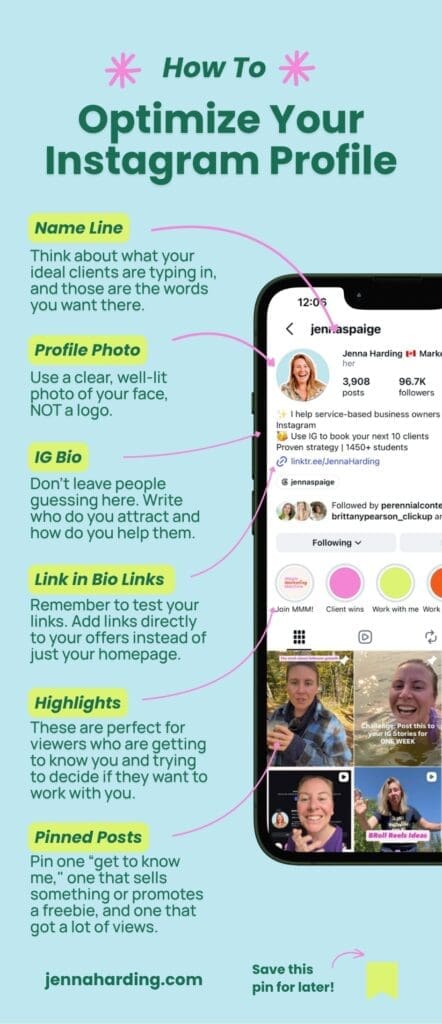
Okay, so we covered a lot, but you should now be well on your way to optimizing your Instagram profile. 🙌🏼
Let’s run through a quick checklist to make sure nothing fell through the cracks:
✅ Update your profile pic –Get rid of the logo. People connect with your smile, not your branding.
✅ Add search terms to your name line – Add your name + plus what you do (in words your ideal client would use!) to your name line.
✅ Test your link in bio links – Make sure all your links are working. And if you’re promoting an offer or freebie, add the link directly to your sales or opt-in page.
✅ Spruce up your Instagram bio – Your bio should tell your ideal clients exactly who you help and the results they’ll get.
✅ Include Instagram Story Highlights on your profile – Whether it’s information, testimonials or you being silly, save important Stories into Highlights on your profile.
✅ Pinned posts to your main profile and Reels tab – Show a first-time visitor what they need to see with a get-to-know-you post, a recent sale or freebie, and a viral post.
And there you have it! That’s EVERYTHING you need to optimize your Instagram profile! 🥳
But listen – you don’t need to change all this stuff at once. Change a couple of things here and there. Do not feel the pressure to do it all in one shot.
Your profile doesn’t have to be perfect by tonight. It just needs to start pulling its weight so that when potential leads click over from your posts or Reels, they have all of the information they need.
If you’re overwhelmed about where to start, try my 5-Minute Bio mini course.
Your bio is usually the first thing people read when they land on your profile. This mini course walks you through writing a bio that helps you get more followers, more engagement, more instant leads, and, of course, makes you look AHHmazing. 💅

Most popular Posts:

How to Win Over the Instagram Algorithm in 2026

3 Types of Instagram Posts You Need to Sign More Clients


